
Call us now :08045479896
 Send Inquiry
 Send Inquiry
MULTISCAN FOR PETROL / DIESEL VEHICLES
MOQ : 1 , , Unit
MULTISCAN FOR PETROL / DIESEL VEHICLES Specification
- Assembly
- Ready to use, no assembly required
- Surface Finish
- Matte
- Power Type
- Powered via vehicle OBDII port
- Weight
- Approx. 350 g
- Features
- Multilingual menu, large LCD display, supports OBDII/EOBD, upgradable firmware
- Use
- Diagnostic scanning for petrol and diesel vehicles
- Model No
- Multiscan Pro
- Size
- Compact
- Style
- Handheld Scanner
- Type
- Automotive scanner
- Material
- High-grade plastic casing
- Dimensions
- 225 x 125 x 75 mm
- Shape
- Rectangular
- Color
- Black with blue highlights
- Function
- Reads and clears diagnostic trouble codes (DTC), live data stream, system testing
- Age
- All vehicle ages supported
- Advantage
- Supports multiple vehicle brands, easy to operate, quick diagnostics
- Connection Interface
- 16-pin OBDII connector
- Display
- 320 x 240 pixel LCD
- Compatibility
- OBDII/EOBD compliant petrol and diesel vehicles
- Operating Temperature
- -10°C to 50°C
- Update Method
- Firmware updates via USB
- Data Storage
- Internal memory for code storage
- Input Voltage
- 12V DC (vehicle supplied)
- Included Accessories
- User manual, carrying case, connection cable
MULTISCAN FOR PETROL / DIESEL VEHICLES Trade Information
- Minimum Order Quantity
- 1 , , Unit
- Payment Terms
- Telegraphic Transfer (T/T), Western Union, Paypal, Cheque
- Supply Ability
- 100 Units Per Week
- Delivery Time
- 1 Months
- Main Export Market(s)
- Australia, North America, Eastern Europe, Middle East, Africa, South America, Asia, Central America
- Main Domestic Market
- All India
MULTISCAN FOR PETROL / DIESEL VEHICLES About
| MULTISCAN FOR PETROL / DIESEL VEHICLES | |
| 1. Complete Worldwide Coverage |
|
| 2. Upgradation through Internet |
|
| 3. Big Capacity 128MB with softwares for Japanese, Korean, Indian Vehicles | |
| 4. DTC, Live Reading, Actuation tests and Keycoding | |
| 5. Connector locations, Wiring Diagrams and help menus | |
| 6. Realtime PC interface through USB port | |
Advanced Diagnostic Capabilities
Multiscan Pro empowers users to perform comprehensive diagnostic scans, covering both petrol and diesel vehicles. This scanner reads and clears trouble codes, views live data, and supports system testing, making it an essential tool for vehicle maintenance and troubleshooting.
User-Friendly Design
Featuring a large, clear LCD display and intuitive multilingual menu, Multiscan Pro prioritizes ease of use. Its ergonomic shape and lightweight build ensure comfortable handling, while the ready-to-use assembly means immediate operation without complicated setup.
Universal Compatibility and Upgradability
With robust support for all OBDII/EOBD-compliant vehicles and firmware upgradable via USB, Multiscan Pro remains future-ready. Its broad compatibility enables diagnostics on multiple brands and models, while regular updates keep its functionality current.
FAQs of MULTISCAN FOR PETROL / DIESEL VEHICLES :
Q: How do I connect the Multiscan Pro to my vehicle for diagnostics?
A: Simply plug the 16-pin OBDII connector into your vehicles OBDII port, typically located under the dashboard. Once connected, the scanner is powered by the vehicles 12V DC supply, allowing immediate access to diagnostics.Q: What types of vehicles are compatible with Multiscan Pro?
A: Multiscan Pro supports all petrol and diesel vehicles that are OBDII/EOBD compliant. It is suitable for vehicles of any age and across multiple brands, making it highly versatile for various automotive needs.Q: When should I use Multiscan Pro for scanning my vehicle?
A: Use Multiscan Pro whenever your check engine light appears, when you want to monitor vehicle performance, or during routine maintenance to ensure your engine systems are functioning properly.Q: Where can I update the firmware of Multiscan Pro?
A: Firmware updates for Multiscan Pro are performed via USB. Connect the scanner to a computer with the supplied cable and follow the manufacturers instructions to download and install the latest firmware updates.Q: What is the process for reading and clearing Diagnostic Trouble Codes (DTC) with this scanner?
A: After connecting Multiscan Pro, navigate the menu to select Read Codes for retrieving DTCs and Clear Codes to erase them from your vehicles memory. The LCD displays comprehensive code information for further action.Q: Does Multiscan Pro store diagnostic information for future reference?
A: Yes, the scanner features internal memory for storing retrieved diagnostic trouble codes, allowing you to track and analyze vehicle issues over time.Q: What are the main benefits of using Multiscan Pro?
A: The key benefits include quick diagnostics, easy operation, support for multiple vehicle types, live data streaming, system testing, and upgradable firmware, all packaged in a robust, portable design with multilingual menus.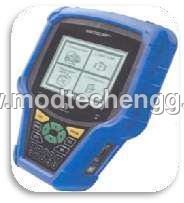
Tell us about your requirement

Price:
Quantity
Select Unit
- 50
- 100
- 200
- 250
- 500
- 1000+
Additional detail
Mobile number
Email

More Products in Tool And Equipments Category
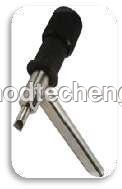
CLICK ADJUSTER - TAPPET ADJUSTER
Price 2000 INR
Minimum Order Quantity : 1 Unit
Dimensions : Standard
Style : Automotive Tool
Size : Standard / Universal
Type : Other, Click Adjuster / Tappet Adjuster
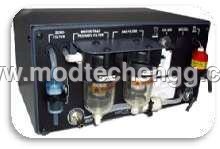
WHEEL ALIGNMENT WITH BUILT IN WHEELS FREE LIFT
Price 200000 INR
Minimum Order Quantity : 1 , , Unit
Dimensions : 2180 x 2180 x 2200 mm
Style : Modern industrial
Size : Standard for passenger cars and light commercial vehicles
Type : Other, 2post wheel alignment lift with integrated free lift
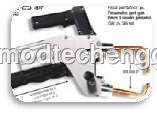
HOT WATER CLEANER
Price 20000 INR
Minimum Order Quantity : 1 Unit
Dimensions : 750 x 500 x 900 mm
Style : Industrial
Size : Standard
Type : Other, Hot Water Cleaner
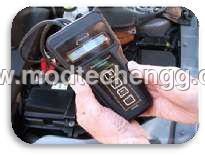
BATTERY TESTER WITHOUT PRINTER
Price 2000 INR
Minimum Order Quantity : 1 Unit
Dimensions : 180 mm x 80 mm x 35 mm
Style : Handheld
Size : Compact
Type : Other, Battery Tester

 Send Inquiry
Our Products
- Cut Section Complete Chassis With Electricals
- Cut Section Complete Chassis Without Electricals
- MODEL OF ENGINE ASSEMBLY WITH CLUTCH & GEAR BOX
- CUT SECTION MODEL OF ENGINE
- Engine Assembly with Clutch & Gear Box
- CUT SECTION MODEL OF TWO STROKE SINGLE CYLINDER DI
- Cut section Model Of Gear Box
- Cut section Model of Steering Gear Box
- Cut Section Model of Clutches
- Cut Section Model of Differential with Rear Axle
- Cut Section Model of Brake System
- Cut Section Model of Electrical System
- Cut Section Model of Fuel Supply System
- Cut Section Model Of Suspension System
- Cut Section Model Of Lubrication & Cooling System
- Cut Section Model Of Different Small Components
- Four Stroke Petrol Carburettor Engine For Practice
- Four Stroke Petrol Mpfi Engine Setup For Practice
- 4 Stroke Petrol Carburator Engine With Lpg Setup
- Four Stroke Petrol Mpfi Engine With Lpg Setup
- Four Stroke Diesel Engine Setup
- Two Wheeler Petrol Engine Of Running Condition
- Instruction Boards/Training Platforms
- Training Module For The Engines
- Test Rigs
- Cut section model Of Complete Vehicle
- Cut Section Model Of Engine Working
- Cut section Model Of Different Automobile Parts
- Cut Section Model Of Two Wheeler Aggregator
- Practice/ Running Engine Setup
- Tool And Equipments
- Model Of Auto Electricals
- Garage Tools & Equipments
- Cut Sectioned Engine Assembly With Clutch & Gear
- Exhibition Models

Plot No. 95, Behind Omex Auto, Bommasandra Jigani Link Road, Jigini Post, Bengaluru - 562105, Karnataka, India

Mr Sunil J.
(Partner)
Mobile :08045479896
 Send Inquiry
 Send SMS
Developed and Managed by Infocom Network Private Limited.
